Read this article to learn about the types of staff permissions available.
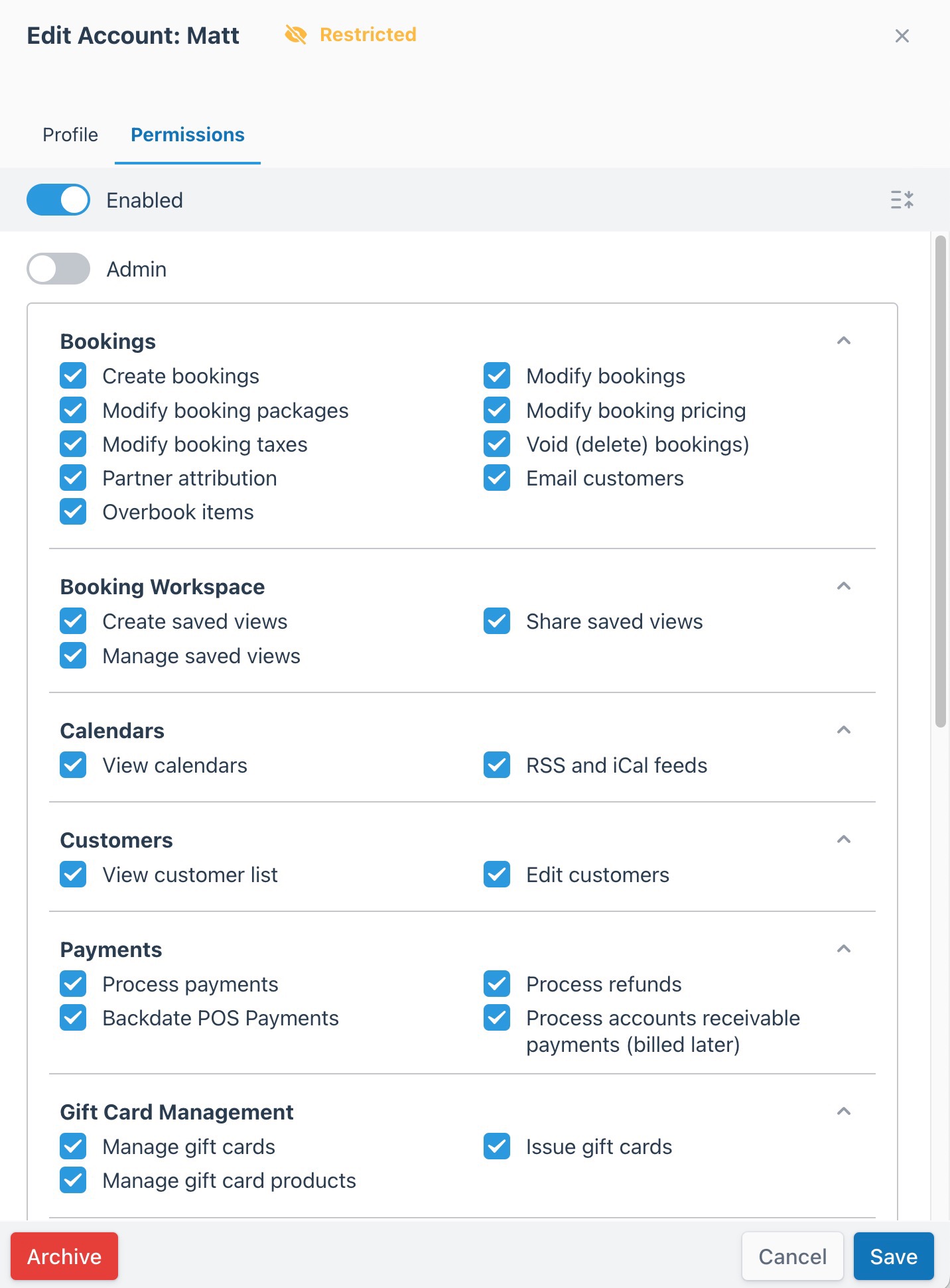
You can turn off admin permissions in the User Accounts area (Account > User Accounts) to restrict staff accounts to select permissions. The following definitions help you assign permissions.
| Permission |
Definition |
| Create bookings |
- Allows users to create staff-side bookings through the main menu (Main Menu > New Booking) or anywhere a New Booking button is displayed in the back office.
- Combined with the permission to View products and assets, this permission allows the user to subscribe to Push Notifications.
|
| Modify bookings |
- Allows users to add and remove products from an existing booking via the Booking Invoice (Booking Details > Booking Invoice > Edit).
- You must check this permission to turn on the following permissions:
- Modify booking packages
- Modify booking pricing
- Modify booking taxes
|
| Modify booking packages |
- Allows users to add and remove packaged upsells from a product from an existing booking via the Booking Invoice (Booking Details > Booking Invoice > Edit > Remove).
- You must check the Modify booking permission for the account to enable and select this permission.
|
| Modify booking pricing |
- Allows users to modify the subtotal of a product from an existing booking via the Booking Invoice (Booking Details > Booking Invoice > Edit > Change > Subtotal).
- You must turn on the Modify booking permission to select this permission.
|
| Modify booking taxes |
- Allows users to add or remove taxes from an existing booking via the Booking Invoice (Booking Details > Booking Invoice > Remove).
- You must turn on the Modify booking permission to select this permission.
|
| Void (delete) bookings |
- Allows users to select the VOID status when changing the booking status from the Booking Invoice (Booking Details > Booking Invoice) for POS and TEST transactions only. You cannot set bookings with live payments processed through a payment provider to the VOID status.
|
| Partner attribution |
- Allows users to view and utilize the Change Partner Attribution button within the Booking Invoice (Booking Details > Booking Invoice > Change Partner Attribution).
|
| Email customers |
- Allows users to view and utilize the email feature within the Booking Invoice (Booking Details > Booking Invoice > Email).
|
| Overbook items |
- Allows the user to overbook products.
|
| Permission |
Definition |
| Create saved views |
- Allows users to create saved views.
|
| Share saved views |
- Allows users to share saved views with restricted users.
|
| Manage saved views |
- Allows users to manage saved views.
|
Calendars
Back to top
| Permission |
Definition |
| View calendars |
- Allows users to view the Calendar menu, providing access to all calendars.
|
| RSS and iCal feeds |
- Allows users to access the Add to External Calendar feature on the Booking Calendar.
|
| Permission |
Definition |
| View customer list |
- Allows users to access the Customer List and a direct link to the Customer Booking Page.
- You must check this permission to turn on and select the Edit customers permission.
|
| Edit customers |
- Allows users to edit Customer Details in the Customer List.
- You must turn on the View customer list permission to turn on and select this permission.
|
| Permission |
Definition |
| Process payments |
- Allows users to access the Add Payment feature on the Booking Invoice page (Booking Details > Booking Invoice).
- You must check this permission to turn on and select the Process refunds permission.
|
| Process refunds |
- Allows the user to access the refund feature on the Transactions page of the Booking Invoice (Booking Details > Booking Invoice).
- You must check the Process payments permission to turn it on and select this permission.
|
| Backdate POS Payments |
- Allows users to specify the Payment Date when adding a payment staff-side.
|
| Process Accounts Receivable Payments (Billed Later) |
- Allows the user to charge the customer for the booking using a third-party payment method, which they then owe to your business on an accounts receivable basis.
|
| Permission |
Definition |
| Manage gift cards |
- Allows the user to manage issued gift cards.
|
| Issue gift cards |
- Allows the user to issue gift cards to recipients.
|
| Manage gift card products |
- Allows the user to manage created gift card products.
|
| Permission |
Definition |
| View products and assets |
- Allows users to view and access inventory and products (Products > Products).
- Allows users to view and access inventory and assets (Products > Resources).
- You must check this permission to turn on and select the Manage products and assets permission.
|
| Manage products and assets |
- Allows the user to add and edit products (Products > Products).
- Allows the user to add and edit categories (Products > Categories).
- You must check the View products and assets permission to turn it on and select this permission.
|
| View events and rules |
- Combined with Manage events and rules, this permission...
- allows users to add product closures from the Inventory Calendar (Calendar > Inventory Calendar).
- allows users to access Product Closures (Products > Product Closures).
- You must check this permission to turn on and select the Manage events and rules permission.
|
| Manage events and rules |
- Combined with View events and rules, this permission...
- allows users to add product closures from the Inventory Calendar (Products > Inventory Calendar).
- allows users to access Product Closures (Products > Product Closures).
- You must check the View events and rules permission to turn on and select this permission.
|
| View discounts |
- Allows the user to view and access Inventory Discounts (Products > Discounts).
|
| Manage discounts |
- Allows users to add and edit Inventory Discounts (Products > Discounts).
|
| Manage notifications |
- Allows users to view the Notifications list. (Configuration > Notifications).
|
| Change daily inventory Availability |
- Allows the user to adjust stock availability within the Inventory Calendar (Calendar > Inventory Calendar).
|
| Permission |
Definition |
| View all reports |
- Allows users to view every report.
|
| Export Data |
- Allows users to export most reports.
|
| Daily List |
- Allows users to access and view the Booking Daily List (Booking > Daily List) report.
|
| Daily Manifest |
- Allows users to access and view the Daily Manifest (Booking > Daily Manifest) report.
|
| Booking Index |
- Allows users to access and view the Booking Index (Booking > Booking Index) and Bookmarks (Booking > Bookmarks).
|
| Booking Sales |
- Allows users to access and view the Sales (Analytics > Sales Report) report.
|
| Transactions |
- Allows users to access and view the Transactions (Analytics > Transactions) report.
|
| Revenue |
- Allows users to access and view the Revenue (Analytics > Revenue) report.
|
| Booking Volume |
- Allows users to access and view the Booking Volume (Analytics > Booking Volume) report.
|
| Booking Traffic |
- Allows users to access and view the Booking Traffic (Analytics > Booking Traffic) report.
|
| Account Activity |
- Allows users to access and view the Account Activity (Analytics > Account Activity) report.
|
| Cashout |
- Allows users to access and view the Cashout (Analytics > Cashout) report.
|
| Promotions |
- Allows users to access and view the Promotions (Analytics > Promotions) report.
|
| Occupancy |
- Allows users to access and view the Occupancy (Analytics > Occupancy) report.
|
| Active Discounts |
- Allows users to access and view the Active Discounts (Analytics > Active Discounts) report.
|
| Commission |
- Allows users to access and view the Commission (Analytics > Commission) report.
|
| Permission |
Definition |
| External API Access |
- Allows external API access to the account.
|
| Access support |
- Allows the user to access and utilize the Support Dashboard (Main Menu > Help).
|
| Permission |
Definition |
| View documents |
- Allows users to access and view Waivers & Documents (Booking > Waivers).
|
| Manage document templates |
- Allows users to access and view Templates (Booking > Waivers > Templates).
- Allows users to edit existing waivers and documents.
|
| View document log |
- Allows users to view the Activity Log for Waivers & Documents (Booking > Waivers > Settings > Activity Log).
|
| Delete documents |
- Allows users to delete Waivers & Documents (Booking > Waivers > Sent & Submitted > Booking ID > Documents > Open View menu).
|
Where can I find this feature using the menu?
- Account > User Accounts > Staff Accounts